


Software solutions for MINIMAT-EC cordless screwdrivers
Possible combinations with cordless screwdriver MINIMAT-EC
Which software is suitable for the bolting system?
ComCenter PC programming kit
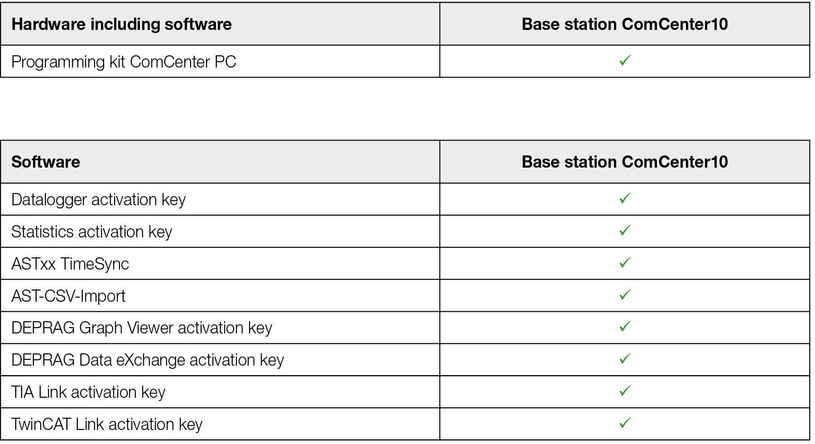
ComCenter10 base station hardware with integrated software
ComCenter PC Programming Kit The software
for MINIMAT-EC cordless screwdriver, cordless and battery-operated EC screwdriver
Bluetooth can be used to connect the screwdriver to the optional ComCenter 10 base station. The convenient operator interface offers a wide range of functions and, via a standard integrated web server, screw processes can be generated and adjusted quickly and easily.
Process integration is also possible for the exchange of screw specifications and result data for documentation and archiving. The base station can be used to control four tools.
This creates the best framework for successful quality management and documentation. The ComCenter 10 base station provides temporary storage and easy access to all daily result data for a whole week. The software data logger can be used to transfer the measurement data of several base stations (up to 10 devices) automatically via Ethernet to a PC. Data evaluation can be performed using the software statistics.
Up to eight multi-stage screwdriving processes, each with the appropriate loosening program, can be set and transferred to the screwdriver using the ComCenter 10 base station or, alternatively, the ComCenter PC programming kit.
The keypad on the screwdriver itself is used to select screwdriver programs. At the push of a button, additional loosening programs can be selected at any time for any screwdriver program.
The ComCenter PC programming kit is a PC software that is used to adjust the parameters of the EC cordless screwdrivers independently of the ComCenter 10 base station. The software license key is stored in the Bluetooth adapter and a release code is also provided. The configuration of as many EC cordless screwdrivers as required can be managed using the ComCenter PC software, simply select the required screwdriver when starting the software.
Range of functions:
Screwdriving programs can be generated and adjusted using the ComCenter PC software. Graphics can be displayed and transferred using the Graph Viewer software module. This is included and automatically installed with the ComCenter PC software.
All settings of the EC cordless screwdrivers can also be managed via the menus of the ComCenter 10 base station web interface. 12 languages are available for the ComCenter PC software and the ComCenter 10 base station user interface.
Datalogger
the software for EC- and EC-Servo screwdriving systems in combination with the AST5, AST6, AST11 and AST40 sequence controllers
The “datalogger” software can be used to record and archive the final values of up to 10 sequence controllers. This storage format corresponds to the required format of the “statistics” software, so that the data sets can be analyzed with the “statistics” software. Select whether the data is collected automatically while the program is running or whether the data readout must be activated manually. The connection to the controllers is made via Ethernet and TCP/IP. The software is available in the following languages: German, English, French, Italian, Spanish.
Statistics
the software for EC- and EC-Servo screwdriving systems in combination with the sequence controllers AST5, AST6, AST11 and AST40
The “statistics” software can be used to produce statistical evaluations of the screwdriving results, which are available via the “data logger” software.
The “data logger” software must also be installed to be able to use the “statistics” software!
ASTxx TimeSync
the software for EC and EC servo tightening systems in combination with AST5, AST6, AST11 and AST40 tightening controls
Time synchronization between PC and AST sequence controller (download via the controller website)
ASTxx TimeSync is a PC software designed for simple date and time synchronization between a PC and any number of sequence controllers.
If the end values of a sequence controller and the data of a PC are to be linked with each other for further evaluation, then the date and time must match exactly so that the correct assignment of the data is carried out. The ASTxx TimeSync program is responsible for time synchronization.
ASTxx TimeSync can be run as a batch program on a server or a PC on the network and can be accessed from any number of sequence controllers. The software runs in the background, sets the date and time of the PC on which it is running and transmits these values to the specified sequence controller. The sequence controller type and IP address must be specified to access the program. The use of this software is free of charge.
AST-CSV-Import
the software for EC- and EC-Servo bolting systems in combination with AST5, AST6, AST11 and AST40 sequence controllers
Free add-in: Add-in for Microsoft Excel to easily import final value csv files into Excel (download via driver website).
DEPRAG graph viewer for the evaluation of bolting curves
the software for EC- and EC-Servo screwdriving systems in combination with ASTxx and ADAPTIVE DFS sequence controllers
During each screw assembly when using an AST sequence controller, the relevant measured values are recorded in a file. Now there is a new software product: the DEPRAG Graph Viewer, to evaluate and analyze these measured values simply and easily.
The Graph Viewer opens the curve files of each sequence controller and can display the following visualizations:
- Display of measured values over time.
In this display, various measurement sizes can be shown in relation to the screwdriving procedure. All available measured values can be displayed in chronological order.
- Display of measured values on angle
In this display, the angle can be analyzed in relation to the screwing procedure. The y-axis can be freely chosen by the user. This can, for example, allow the analysis of the angle in relation to the torque or the angle in relation to the motor current, etc. To precisely analyze the screw assembly, a video can be played in angle display. Use the “start” and “pause” buttons in the same way as a video player to display the sequence of the bolting process curve. Individual sequences can be selected and displayed using the time bar.
- Superimposition of measured values in time / in angle
In addition to angle display and time display, there is also the option to display several curves at the same time to draw correlations and recognize trends. Any number of curves can be added.
It is also possible to align curves to specific synchronization points and to hide or display bolting steps.
In addition to the bolting curves, processing data and parameters can also be accessed. The entire process can be analyzed and evaluated using a single piece of software. The process data can be printed out as documentation.
DEPRAG Data eXchange
the software for EC- and EC-Servo screwdriving systems in combination with ASTxx and ADAPTIVE DFS sequence controllers
AST sequence controllers, the ADAPTIVE DFS adaptive screwdriving system and the ComCenter document the relevant processing data for each set of screws, which is then saved in a distinctive DEPRAG format.
The so-called “graphic files” contain all bolt curves, end values and details related to the bolting process and are only readable by DEPRAG’s own software solutions. To use and analyze this data in other systems, it is necessary to convert the internal format into a universal machine-readable format.
The new DEPRAG Data eXchange software solution allows exporting DEPRAG graphic files as csv or Excel files. This data can now be used in other software solutions. Optional application areas include:
– integration into a database
– analysis in Matlab
– SAP integration
– archiving in customer-specific processing software
Compatibility: all Windows systems (7, 8, 10) with no configuration required. The software is self-configuring and ready to run with a single click.
TIA Link
the software for the DEPRAG Plus screwdriving system as well as the EC and EC-Servo screwdriving systems in combination with the sequence controllers AST11, AST12, AST40, AST6, including i-versions and for ComCenter 10
TIA LINK software for easy integration into SIMATIC controllers
Integration into the Siemens programming environment (Totally Integrated Automation (TIA) Portal) is required to operate DEPRAG devices with the current SIMATIC controllers. This integration is quite time-consuming and requires expert domain knowledge of DEPRAG devices. Therefore, the TIA software link has been created to enable simple integration of the following DEPRAG products: AST11, AST12, AST40 incl. i-versions, AST 6 incl. i-versions, ComCenter 10.
The software includes not only integration into the TIA portal for the above products, but also several quick-start projects in the “structured text” programming language without first establishing communication using the user manual. The TIA Link software features significant time savings due to considerably reduced programming efforts. In addition to the fieldbus connection, additional examples are provided for controlling the bolting system. The following SIMATIC controllers are supported: SIMATIC S7-1200, SIMATIC S7-1500 and SIMATIC ET 200SP (CPU).
The software is available as a download.
TwinCAT Link
the software for the DEPRAG Plus screwdriving system as well as the EC and EC-Servo screwdriving systems in combination with the sequence controllers AST11, AST12, AST40, AST6, including the i versions and for the ComCenter 10
Integration into the Beckhoff programming environment is required to operate DEPRAG devices with current Beckhoff controllers. The TwinCAT Link software has been created to enable easy integration of the following DEPRAG products: AST11, AST12, AST40 incl. i-versions, AST 6 incl. i-versions, ComCenter 10, ComCenter 10, ComCenter 10, ComCenter 10, ComCenter 10, ComCenter 10, ComCenter 10, ComCenter 10, ComCenter 10.
The software includes not only the integration of the above products, but also several quick-start projects in “structured text” programming language that allow immediate execution of screw assemblies without first establishing communication via the user manual.
Quick-Start projects are available for the TwinCAT 2 version as well as for the TwinCAT 3 version. The TwinCAT Link software features significant time savings due to considerably reduced programming efforts. In addition to the fieldbus connection, additional examples for controlling the bolting system are provided.
The following Beckhoff software systems are supported: TwinCAT 2 and TwinCAT 3
The software is available as a download.


